Client Services Toolbar
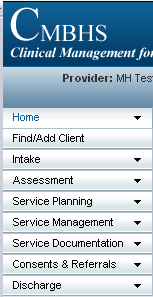
THE CLIENT SERVICES TOOLBAR
When you have logged into the Clinical Management for Behavioral Health Services (CMBHS) application and are at a Client Workspace, you will see the Client Services toolbar down the left side of the page.
All parts of the Client Services Toolbar do not display when you are not in a client’s health record. To see the entire Client Services Toolbar and all the sub-menus, you must select and open a CMBHS client record.
CLIENT SERVICES TOOLBAR TABS
- There are nine (9) tabs on the CMBHS Client Services Toolbar.
- CLICK ON any of the Tab Names below to go directly to that item to find out more about the pages and functions included under that tab or menu item.
What’s Next?
- CLICK ON any LINK below to go directly to that topic in the CMBHS Help
Or
- SCROLL through the descriptions and at the bottom of the page CLICK ON NEXT to go to the next topic.
HOME TAB
(CLIENT SERVICES TOOLBAR)
- This tab takes you to your home page which will be either a workspace, such as the Clinician Workspace, or functioning page, depending on your assigned role(s).
FIND/ADD CLIENT TAB
- This tab tab takes you to the page where you can either enter a client's name to conduct a search or add a client.
INTAKE TAB
- The functions under this heading are used to determine client clinical and financial eligibility.
- Screening .
- Page # SCR014
- Screening for allclient populations are documented here(adult, adolescent and child mental health and adult andyouth substance abuse services)
- Financial Eligibility
- Page # FNE042
- Documentation of the financial eligibility determination process.
- Wait List Entry
- Page# WTL052
- Used to place a client on a provider waiting list.
- Client Reservation
- Page # WTL054
- From here, the user can make a reservation for a client for admission to a provider organization. Primarily used by substance abuse OSARs.
- Admission
- Page # ADM029
- Documentation of client admissions.
ASSESSMENT TAB
Psychosocial assessments for mental health services (adult, adolescent and child) and substance abuse services (adult and youth) are documented here.(Page AST022).
- Initial
- Page AST022.
- The first assessment completed during an episode of care.
- Update
- Page AST022.
- Updates to the initial assessment completed on a regular schedule and when there is a significant change in the client’s condition or situation.
- Discharge
- Page AST022.
- Assessment completed at the time of discharge.
SERVICE PLANNING TAB
- Treatment/Service Plan
- Used to document a treatment/service plan.
- Treatment/Service Plan Review
- To document the review and update of a treatment/service plan.
SERVICE MANAGEMENT TAB
The functions under this tab allow users to manage the services the client receives during the episode of care and to admit the client to the provider and discharge them from the provider’s services.
- Admission
- Page # ADM029.
- This page is used to document the admission of a client to a provider.
- Discharge
- Page # ADM029.
- This page is used to document the discharge of a client from a provider.
- Service Authorization Request
- Page # SVC047
- A Service Requester documents a request for service authorization on this page.
- Begin Service
- Page # SER030.
- This page allows documentation of a service beginning for a client without impacting admission or discharge status.
- End Service
- Page # SER030.
- Document the end of a specific service the client is receiving but does not impact admission or discharge status.
SERVICE DOCUMENTATION TAB
NOTES
- CMBHS provides a variety of note types that users can chose from to document clinical and administrative events.
- Progress Note
- Page # NTS033.
- Linked to the Treatment Plan and used to document services provided to the client’s and the client’s response.
- Psycho Educational Note
- Page # NTS027.
- (Single Client) – For documentation of psychoeducational services to a single client.
- Administrative Note
- Page # NTS028.
- (Single Client) - Notes not related to the clinical aspects of service delivery documented for a single client.
- Crisis Note
- Page # NTS028.
- (Single Client) – Documentation of a crisis contact or delivery of crisis services to a client.
MEDICATION
- Medication Order
- Page # MED060
- Access to pages for documentation of Physician’s orders for medication.
- Medication List
- Page # MED058.
- Access to medication lists.